
freemkv-library
freemkv-library is the freemkv web server and replaces autorip: insert a disc, and it automatically captures and muxes the selected movie or TV episodes. A browser-based UI shows live progress, settings, and history, with nothing to type, and a Library tab manages the MKVs and ISOs you already have. This page covers deploying freemkv-library and tuning it; for manual title selection, use the CLI or desktop app.
On disc insert, freemkv-library runs the full pipeline automatically: a tolerant sweep, targeted patch retries on bad ranges, decrypt, and mux to MKV. Multiple drives rip in parallel, each with independent state.
freemkv-library runs on a host with an optical drive (a home server or NAS works well) and ships as a Docker image. The configuration and API reference below apply to every platform.
The freemkv-library dashboard during an active rip: matched title and metadata up top, with live per-pass progress, ETA, and throughput below.
Deploy
Section titled “Deploy”Docker
Section titled “Docker”Published to GHCR as ghcr.io/freemkv/freemkv-library (:latest and :vX.Y.Z); the same image is also still published as ghcr.io/freemkv/autorip, so existing installs keep pulling. Drop this compose file on a host with an optical drive and bring it up:
services: freemkv-library: image: ghcr.io/freemkv/freemkv-library:latest container_name: freemkv-library restart: unless-stopped privileged: true # REQUIRED for optical SCSI drive access stop_grace_period: 75s # let a rip drain on stop (default 10s is too short) environment: - AUTORIP_DIR=/config # where settings.json + logs live - PORT=8080 # web bind port (set at start, not at runtime) - AUTORIP_LOG_LEVEL=autorip=info,libfreemkv=warn,freemkv=warn # tracing filter volumes: - /dev:/dev # live host /dev (handles USB re-enumeration) - ./config:/config # settings.json + logs - /mnt/media:/output # final MKV / M2TS destination - /tmp/autorip:/staging # intermediate ISO + mapfile - /sys:/sys:ro # read-only sysfs ports: - 8080:8080 healthcheck: test: ["CMD", "/usr/local/bin/freemkv", "server", "--healthcheck"] interval: 30s timeout: 5s start_period: 20s retries: 3docker compose up -dThen open http://<host>:8080.
Using the dashboard
Section titled “Using the dashboard”Drives: correct a title without restarting the capture
Section titled “Drives: correct a title without restarting the capture”Change title selects the movie or show used for library naming. Pick a TMDB result to save its title, year, media type and ID, or enter a name manually. The correction is saved with the disc’s staging job before the dashboard reports success. It survives Stop, a library reboot and a later resume of the same disc.
Staging identity is separate from the display name: AACS discs use their disc hash; other discs use a content-sampled fingerprint and capacity. A title alone is not sufficient to resume another disc’s capture. Existing matching staging is adopted in place; the active ISO and recovery map are not renamed when you correct a title. Two matching partial jobs are held for review, not merged or deleted automatically.
If damaged sectors prevent fingerprinting, a fresh isolated capture can still start, but it does not automatically adopt an older partial job. The dashboard logs that identity could not be verified; cross-restart resume by disc identity is unavailable for that capture.
You can correct a title during capture. Changing a show’s TMDB identity or movie/TV selection can require rebuilding the episode plan before delivery. If that plan needs sectors missing from the saved ISO, insert the same disc and resume. A single-pass rip must be stopped before changing movie/TV selection or the show’s TMDB identity. Once delivery has begun, a title correction is refused rather than racing the copy to the library.
Moving files to your library
Section titled “Moving files to your library”Each file is delivered independently. During copying its row shows progress, speed and estimated time remaining. Finalizing means the bytes have been copied but flushing, verification or publication is still in progress; it does not show a stale transfer rate. Delivered rows collapse into a completed-file count while the remaining files continue. The whole job finishes only when all required files are delivered and staging cleanup succeeds.
A failed delivery keeps the staged source. Copy and validation failures retry after 30 seconds, then after two minutes; after three failed attempts, automatic retries stop. An unsupported required operation stops automatic retries immediately. Fix the reported destination problem, then choose Retry or Retry all under Needs action. These controls reset the retry budget; they do not delete media. Retry state currently lasts for the running Library process, so a reboot starts a fresh retry budget.
If a copy makes no byte progress for 60 seconds, Library reports the stalled operation and destination and requests cancellation. It retains the staged sources and delivery journal. Retry stays unavailable until the copy worker returns: a blocked filesystem call cannot safely be abandoned, and a publication already in progress may still finish. Restore the destination filesystem, wait for the worker to return, then retry to reconcile any completed delivery.
Accessible in System describes the folder-access check, not successful delivery of a particular file. Outstanding delivery errors are reported separately even if every folder answers its access checks.
Library: remux and audit
Section titled “Library: remux and audit”Remux rebuilds media from a saved ISO with this version of freemkv. Movies normally produce one output; recognized TV episode selections can produce multiple episode files. Existing files are replaced only after their replacements pass validation. Disc ripping takes priority over a library remux.
Ambiguous automatic TV selection is held for review rather than silently remuxed as one movie. A complete selection containing zero or one episode retains the single-output behavior, as do movies and jobs with automatic TV handling disabled. Existing saved output plans are reused unless a metadata correction requires replanning.
Correct a saved ISO’s movie or TV match
Section titled “Correct a saved ISO’s movie or TV match”Choose Change match on an eligible ISO row, search TMDB, then choose Remux as movie or Remux as TV. The correction is saved for that ISO and a corrected remux is queued. This reads the saved ISO, not the optical disc: you do not need to insert or recapture the disc. The ISO is kept. Active jobs and jobs with retained output to deliver do not offer Change match.
For TV, set the season and, when known, the disc number. TV First episode (optional) is an explicit starting episode number from 1 to 65535. For example, if you have confirmed that the two selected programs are episodes 4 and 5, enter 4. The saved value is shown when you reopen the dialog; clearing it removes the override. The complete output numbering must also fit within the supported range.
A later-disc number, the number of programs on that disc, or their runtimes does not establish the first episode. A later-disc multi-episode plan without a confirmed First episode stops for review rather than guessing an offset. This number controls episode numbering; it does not prove which titles are episodes. Unsupported or ambiguous authored title selection still needs review.
An explicit Remux as TV choice requests TV planning even when automatic TV handling is disabled. Remux as movie uses the main-movie single-output plan and clears the TV season, disc and first-episode fields in the saved match. The dialog lists source-linked files affected by the correction. The new output set must pass verification before those old files are replaced or removed; unlinked files are left alone unless you explicitly authorize them.
For older outputs without source links, expand Confirm legacy outputs belonging to this ISO. Candidates from the current complete movie and TV folder scan start unchecked. Select only files you know were produced from this ISO, then check the separate ownership confirmation. This is your authorization to remove those exact files after every replacement output is verified—not a claim that the app recovered their source provenance. Unselected files and the ISO stay untouched. Unsafe, unavailable or aliased candidates are omitted; filename similarity is not proof.
The preview expires after ten minutes and can be submitted only once. If the ISO, selected files, roots, saved match or recorded ownership changes, reopen Change match for a fresh preview. Ambiguous filename groups still offer correction for each indexed ISO; they do not authorize deleting the group’s MKVs automatically.
Audit checks existing library media; it does not create replacement MKVs. Use the respective needs-work selection to queue only titles needing an audit or remux. Stop cancels the current work and clears that queue; Pause keeps the queue for resuming later.
System: storage, staging and reboot
Section titled “System: storage, staging and reboot”System shows storage space and folder health together. Clear staging removes recognized idle staging entries and retained remux output. It preserves active captures, mux jobs, deliveries, and unknown or unreadable entries. Clearing an interrupted capture discards its resume progress and saved title correction; it does not delete the original ISO or MKV already in the library.
Reboot library restarts the library’s internal services, not the computer or container. It drains active work at a safe boundary and reloads the saved state. If an old worker cannot drain, restart waits rather than starting a second set of workers; requests receive a temporary draining response until it is safe. Both reboot and staging cleanup require a second confirmation click.
Container lifecycle
Section titled “Container lifecycle”stop_grace_period: 75s gives a rip time to cancel and drain on a restart or redeploy; Docker’s default 10 seconds is too short for a drive mid-recovery, which can take up to about a minute.
Unraid
Section titled “Unraid”Unraid web UI > Docker > Template Repositories: add https://github.com/freemkv/unraid-templates and Save. Then Add Container and pick freemkv-library. The template sets privileged mode, /dev and /sys, port 8080, and paths for /config, /output, /staging and the keys directory (defaults under /mnt/user/appdata/freemkv-library and /mnt/user/media); check them and Apply.
Upgrading from autorip
Section titled “Upgrading from autorip”Pull the new image. freemkv-library reads autorip’s /config/settings.json unchanged and keeps the AUTORIP_* environment variable names, so an existing install can point at the same ./config directory. The image also still answers to the autorip command. From 1.8.0 there are no native binary downloads and no Homebrew formula; freemkv-library ships only as this Docker image.
Mount reference
Section titled “Mount reference”| Mount | Purpose |
|---|---|
/dev:/dev |
Live host device tree; lets freemkv-library enumerate optical drives and survive USB re-enumeration. |
/config |
Persistent home for settings.json, per-device logs, and (by default) the keys directory. |
/output |
Where finished MKV/M2TS files land. |
/staging |
Intermediate ISO + mapfile during a multipass rip. |
/sys:ro |
Read-only sysfs. |
Decryption keys
Section titled “Decryption keys”DVDs need none; Blu-ray and 4K UHD need keys. See Decryption Keys for the options (a local file or an online service). freemkv-library’s key settings live in Configuration → Keys below.
For Docker, bind-mount a host directory to /root/.config/freemkv so keys persist across restarts:
volumes: - ./config/keys:/root/.config/freemkvBootstrap environment variables
Section titled “Bootstrap environment variables”These are read at container start and cannot be changed at runtime:
| Variable | Default | Meaning |
|---|---|---|
PORT |
8080 |
Web UI / API bind port. |
AUTORIP_DIR |
/config |
Where settings.json and logs are stored. |
AUTORIP_LOG_LEVEL |
autorip=info,libfreemkv=warn,freemkv=warn |
tracing filter for log verbosity. |
RIP_USER |
autorip |
Unix user the container creates and runs the daemon as. |
NFS_HOST |
(unset) | If set with the two below, freemkv-library mounts an NFS share inside the container at startup. |
NFS_EXPORT |
(unset) | Export path on the NFS server (e.g. /mnt/pool/media). |
NFS_MOUNTPOINT |
(unset) | Where to mount the share inside the container; point output_dir here. |
NFS_OPTS |
(sensible default) | Optional override for NFS mount options. |
Everything else is configured through the web UI and persisted to settings.json. The NFS mount is best-effort: if the server is unreachable the container still starts and logs the failure.
Configuration reference
Section titled “Configuration reference”All settings are editable in the Settings page of the web UI and stored in settings.json under AUTORIP_DIR.
Paths and library
Section titled “Paths and library”| Setting | Default | Meaning |
|---|---|---|
staging_dir |
/staging |
Where intermediate ISO + mapfile live during a rip. |
output_dir |
/output |
Final MKV / M2TS destination. |
movie_dir |
(empty) | Optional subdirectory under output for movies. |
tv_dir |
(empty) | Optional subdirectory under output for TV. |
output_format |
mkv |
Output container: mkv, m2ts, iso, or network (stream to network_target). |
network_target |
(empty) | Network output target host:port (for streaming output). |
keep_iso |
false |
Keep the intermediate ISO in the library after muxing. |
iso_dir |
(empty) | Where a kept ISO (or a whole-disc output_format = "iso" rip) is filed. A relative path resolves under output_dir; an absolute path targets another disk. Empty files the ISO beside the muxed title. |
Disc handling
Section titled “Disc handling”| Setting | Default | Meaning |
|---|---|---|
on_insert |
scan |
What to do on disc insert: nothing, scan, rip, or resume (prefer resuming an existing partial rip). |
auto_eject |
true |
Eject the disc automatically after a rip completes. |
main_feature |
true |
Rip only the longest (main feature) title. |
presentation_language |
(empty) | Prefer a content presentation, for example de or en, without removing audio tracks. Independent of interface language; unsupported, unmatched or ambiguous authored launch choices require review. |
tv_auto |
true |
Automatically split detected TV discs into episode files under Show (Year)/Season NN/ when supported authored episode evidence identifies the selection. Ambiguous multi-title selections require review before muxing. false disables automatic episode splitting and uses the single-output path; it does not itself hold TV discs for review. |
min_length_secs |
600 |
Ignore titles shorter than this many seconds. |
This applies to automatic episode planning for both fresh rips and library remuxes;
an explicit Remux as TV correction requests TV planning regardless of tv_auto.
Existing saved plans and retained delivery-only jobs are not automatically
reselected when tv_auto changes. Whole-disc ISO capture does not require an
episode selection; title-matching and other safety checks can still require
review independently of this setting.
Presentation language and audio retention
Section titled “Presentation language and audio retention”Set Settings → Presentation language (presentation_language) to de to
prefer the German authored presentation when planning a title output. Library
retains all audio tracks in the selected title; the preference does not filter
those tracks or combine audio from other presentations. Interface language never
supplies a content preference.
An empty value leaves presentation language unspecified. The shared model can fall back to requested audio languages in the desktop or CLI, but Library’s all-audio policy supplies no such language preference. Supported DVD root-menu language choices therefore require review with an empty setting rather than silently choosing the first title. Unmatched or ambiguous choices and incomplete launch proof also require review; neither runtime similarity nor a TMDB match resolves that uncertainty.
The preference is used when creating a selection plan. Existing saved plans and retained delivery-only jobs keep their selected title indices; changing the setting does not silently reselect them. Authored launch evidence is separate from the episode-roster and confirmed-numbering requirements described above.
Recovery tuning
Section titled “Recovery tuning”| Setting | Default | Meaning |
|---|---|---|
max_retries |
1 |
0 = single-pass (no retries); 1-10 = multipass with that many patch passes. |
on_read_error |
stop |
On a read error during the sweep: stop or skip (skip-ahead). |
abort_on_lost_secs |
0 |
Tolerated main-movie loss in seconds after retries; 0 = require a perfect rip. |
capture_without_keys |
false |
Capture to ISO even when AACS keys are missing, deferring the mux. |
max_rip_duration_secs |
28800 (8 h) |
Hard ceiling on total rip time across all passes. |
min_pass_budget_secs |
5400 (90 m) |
Minimum wall-clock budget allotted to each pass. |
transport_recovery_delay_secs |
5 |
Delay after a USB transport re-enumeration before retrying the drive. |
decrypt_threads |
0 |
Decryption worker threads; 0 = auto-detect CPU cores. |
| Setting | Default | Meaning |
|---|---|---|
key_source |
local |
local (use a local key database) or online (use a key service). |
keydb_path |
(unset) | Explicit path to a local key database file. |
keydb_url |
(empty) | URL to download a key database from (used by the update action and daily refresh). |
keyserver_url |
(empty) | Base URL of an external key service (when key_source = online). |
keyserver_secret |
(empty) | Optional bearer token for the key service. |
Metadata and notifications
Section titled “Metadata and notifications”| Setting | Default | Meaning |
|---|---|---|
tmdb_api_key |
(empty) | TMDB API key for title lookup / matching. |
webhook_urls |
(empty) | Webhooks that receive a JSON POST on pipeline events. Each entry has a url and post_rip / post_mux / post_move flags (all true by default) choosing which stages it fires on. |
log_retention_days |
30 |
How long to keep per-device .log files. |
Recovery
Section titled “Recovery”freemkv-library wraps the same recovery engine as the freemkv CLI; see How recovery works for the full sweep-and-patch model. The max_retries setting selects between two modes.
Pass modes
Section titled “Pass modes”- Single-pass (
max_retries = 0) streams the disc directly to the output container. No intermediate ISO, no retries. Fastest path; appropriate for healthy discs. - Multipass (
max_retries ≥ 1) runs the full recovery pipeline:- Sweep reads the whole disc to an intermediate ISO, recording good and bad ranges in a mapfile and skipping ahead over damage.
- Patch re-reads the bad ranges from the disc, up to
max_retriestimes. - Mux decrypts the ISO and writes the final container.
Multipass exits the retry loop early as soon as there are no unreadable bytes left.
Accepted loss
Section titled “Accepted loss”After retries are exhausted, freemkv-library evaluates abort_on_lost_secs against main-movie loss only (menus and trailers are excluded):
abort_on_lost_secs = 0: perfect rip required; abort if any main-movie data is still unreadable.abort_on_lost_secs = N: finish the MKV as long as no more thanNseconds of main-movie video are missing.
With output_format = "iso" (a whole-disc image), abort_on_lost_secs is ignored and treated as 0: a whole-disc backup always requires a perfect rip. The tolerance applies only to muxed MKV / M2TS output.
When a rip aborts on loss, the staging directory is preserved so you can review or retry.
Time budgets
Section titled “Time budgets”max_rip_duration_secs caps total wall-clock time across all passes. min_pass_budget_secs guarantees each pass a minimum amount of time. Together they keep a badly damaged disc from running indefinitely while still giving each recovery pass a fair shot.
Web UI
Section titled “Web UI”The dashboard at http://<host>:8080 shows each drive’s current state and live progress (status, percentage, ETA, bad ranges). From it you can:
- Scan, rip, stop, and eject per drive.
- Edit any configuration value in Settings.
- Review held rips (when title matching needs confirmation) and pick the correct title, optionally via a TMDB search.
- Inspect per-device logs and the system debug log.
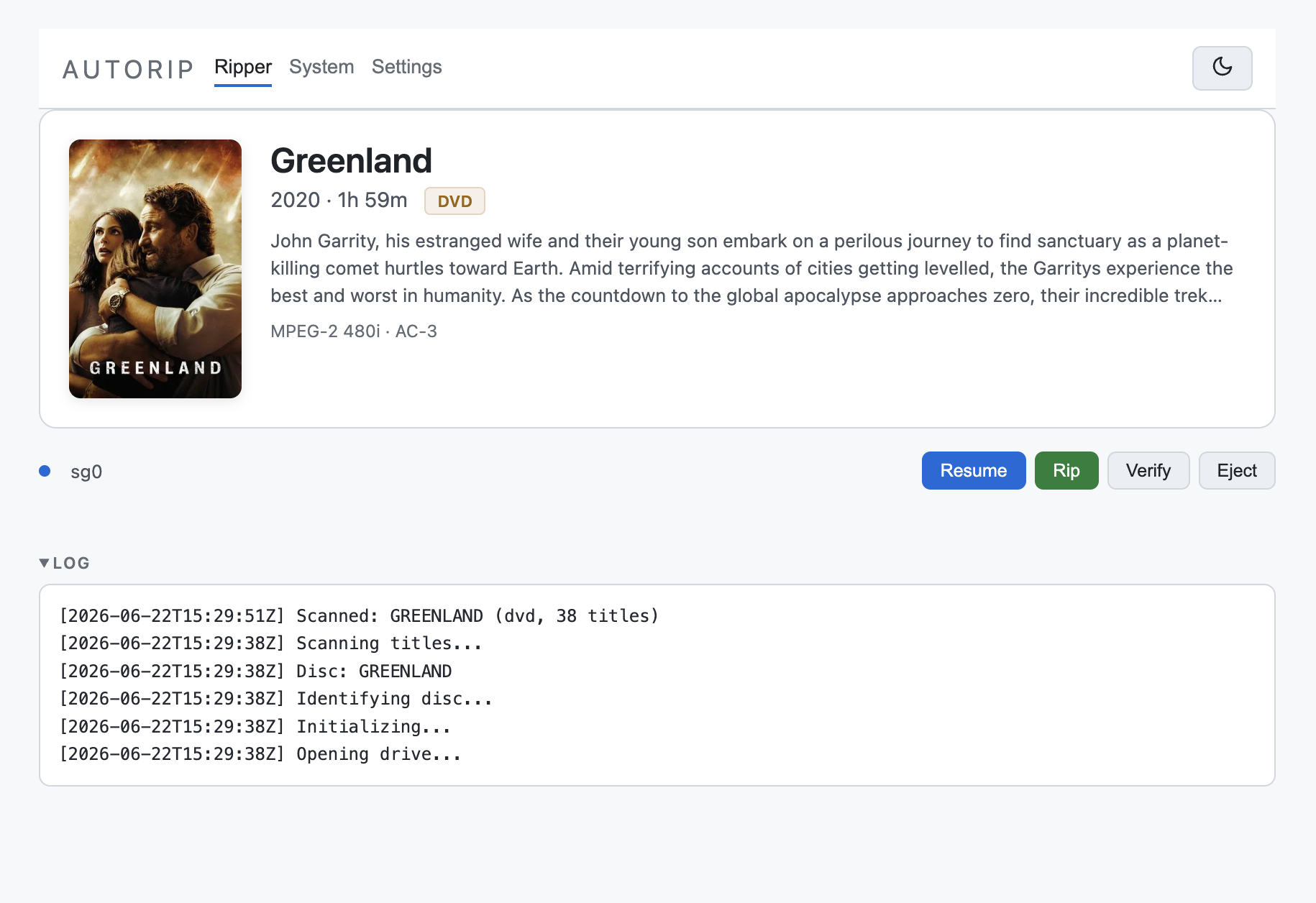
Per-drive controls (Resume, Rip, Verify, Eject) with the live device log expanded below.
State updates stream to the browser over Server-Sent Events (/events).
Library
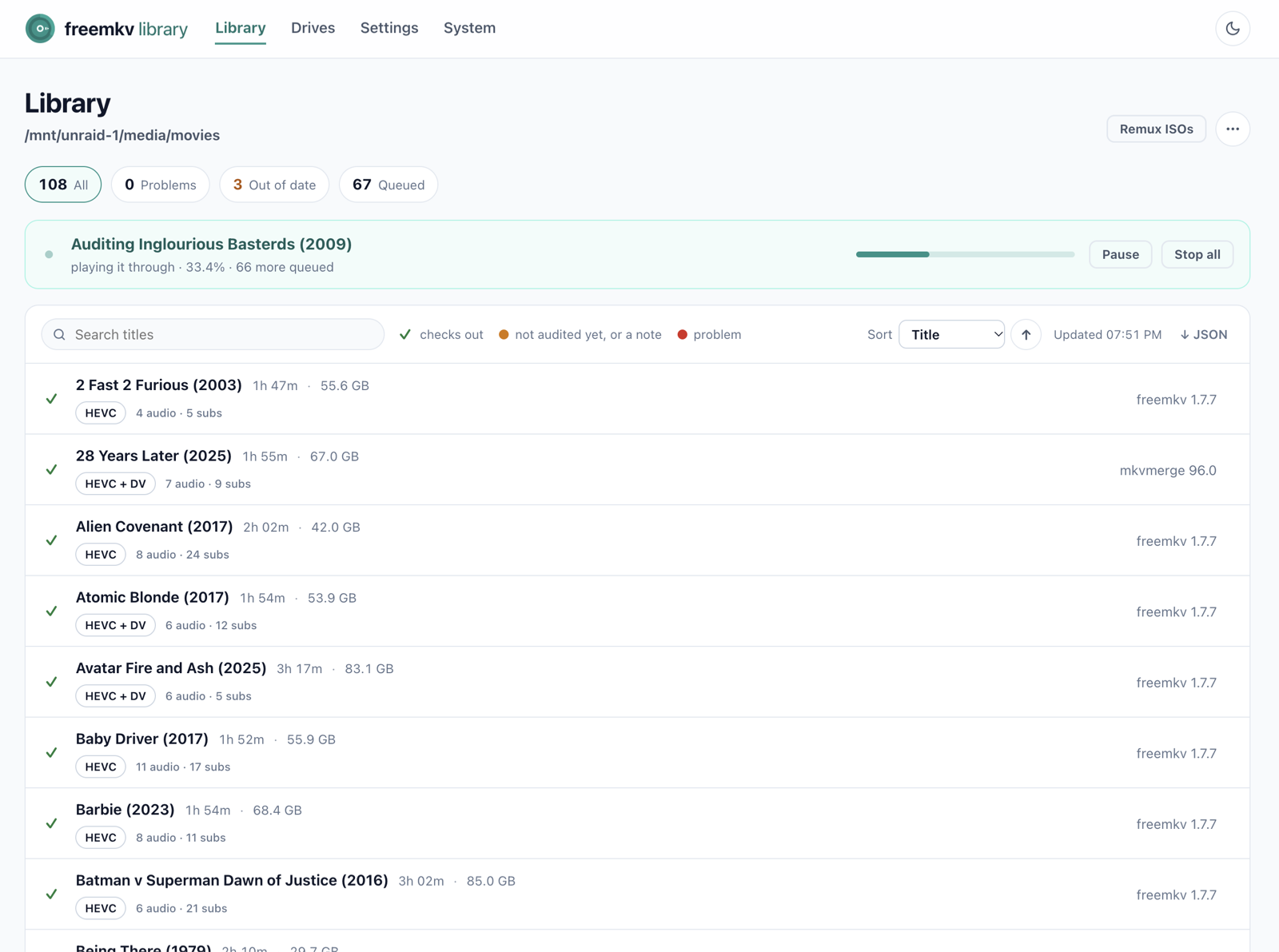
Section titled “Library”The Library tab lists your MKVs and ISOs side by side, shows which freemkv version muxed each MKV, and can remux an out-of-date title from its ISO. It also audits the library.
API reference
Section titled “API reference”freemkv-library exposes an HTTP API on the same port as the UI. JSON errors use {"ok": false, "error": "..."}; simple successes return {"ok": true}. {device} is a drive identifier from /api/state.
State and info
Section titled “State and info”| Method | Path | Description |
|---|---|---|
GET |
/api/state |
Snapshot of every drive’s rip state, plus move/verify state. |
GET |
/api/version |
Running version, e.g. {"version":"1.8.0"}. |
GET |
/api/system |
System info: mux/move queues and the output file list. |
GET |
/events |
Server-Sent Events stream of live state pushes. |
Settings
Section titled “Settings”| Method | Path | Body | Description |
|---|---|---|---|
GET |
/api/settings |
- | Full configuration (secrets redacted). |
POST |
/api/settings |
JSON config fields | Overlay and persist settings to settings.json. |
Rip control
Section titled “Rip control”| Method | Path | Query / Body | Description |
|---|---|---|---|
POST |
/api/scan/{device} |
- | Scan the disc (no rip). |
POST |
/api/rip/{device} |
?resume=yes|no (optional) |
Start a rip. See Resume below. |
POST |
/api/stop/{device} |
- | Stop the active rip; preserves staging for resume (404 if device unknown). |
POST |
/api/title/{device} |
job_id, title, year, optional media_type, tmdb_id, poster_url, overview |
Save the disc’s naming metadata. Use the job_id from the current drive state; stale jobs or delivery already begun return 409. |
POST |
/api/eject/{device} |
- | Eject the disc (409 if a rip/scan is in progress). |
POST |
/api/accept-loss/{device} |
- | Accept the recorded main-movie loss on a rip that aborted on loss, and deliver it as-is. See Accepted loss. |
Error queues
Section titled “Error queues”| Method | Path | Description |
|---|---|---|
POST |
/api/mux-errors/clear?path=... |
Clear one failed-mux entry. |
POST |
/api/mux-errors/clear-all |
Clear every failed-mux entry. |
POST |
/api/move-errors/clear?path=... |
Clear one failed-move entry. |
POST |
/api/move-errors/clear-all |
Clear every failed-move entry. |
| Method | Path | Description |
|---|---|---|
POST |
/api/update-keydb |
Download the key database from the configured keydb_url (SSRF-guarded fetch). |
Review and metadata
Section titled “Review and metadata”| Method | Path | Body | Description |
|---|---|---|---|
GET |
/api/review |
- | List rips on hold awaiting operator review. |
POST |
/api/review/resolve |
{dir, action, title, year} |
Resolve a held rip: proceed, retitle, or cancel. |
GET |
/api/tmdb/search |
?q=query |
Search TMDB for title candidates. |
POST |
/api/title/{device} |
{title, year, poster_url, overview, media_type} |
Override the matched title for the active disc (one-shot). |
Debug and logs
Section titled “Debug and logs”| Method | Path | Query / Body | Description |
|---|---|---|---|
GET |
/api/logs/{device} |
- | Per-device log, most recent lines first (plain text). |
GET |
/api/debug |
?n=&level=&device=&q= (optional) |
Recent debug events (JSON, filterable). |
POST |
/api/debug |
{"enabled":true|false} |
Toggle debug logging at runtime. |
Toggle debug logging and watch the mux stage:
# enable debug loggingcurl -s -X POST http://<host>:8080/api/debug -d '{"enabled":true}'
# stream mux-stage output from the containerdocker logs freemkv-library --tail=500 -f | grep -i mux
Resume
Section titled “Resume”freemkv-library’s recovery work survives interruptions.
- Default (
POST /api/rip/{device}, no param): starts a fresh sweep — the mapfile is recreated and the ISO truncated. It does not delete an existing staging directory, but it does not resume one either; a disc already marked.completedis skipped rather than re-ripped. ?resume=yes: require an existing resumable staging directory. If the sweep is incomplete, it continues the partial sweep, re-reading only the not-yet-recovered ranges from the disc; if the mapfile is already fully recovered, it re-muxes the staged ISO without any disc reads. If no resumable state exists, the request still returns200and the rip ends in an error state (there is no synchronous404).?resume=no: wipe staging and start completely fresh.
Stopping a rip with /api/stop/{device} preserves staging, so a stopped rip resumes on the next disc insert or container restart, with no time lost on a long UHD rip.
Output and notifications
Section titled “Output and notifications”Finished files land in output_dir, optionally split into movie_dir / tv_dir. Set webhook_urls to have freemkv-library POST a JSON event to external systems (a media server, a chat webhook) when a rip, mux, or move completes.
When a rip finishes, freemkv-library sends a rip_complete payload:
{ "event": "rip_complete", "title": "Dune: Part Two", "year": 2024, "format": "UHD", "poster_url": "https://image.tmdb.org/...", "duration": "2h 46m", "codecs": "HEVC 4K HDR10 · TrueHD 7.1 · ...", "size_gb": 78.4, "speed_mbs": 24.1, "elapsed_secs": 5460, "output_path": "/output/Dune Part Two (2024)/Dune Part Two (2024).mkv", "errors": 0, "lost_video_secs": 0.0}When the MKV has been produced from the staged ISO, a mux_complete payload with the same fields as rip_complete ("event": "mux_complete").
When the file is moved to its final destination, a smaller move_complete payload:
{ "event": "move_complete", "title": "Dune: Part Two", "output_path": "/output/..." }